Up two levels (Moto index)
Back to Home
for 902-928 MHz Amateur Use
By Robert W. Meister WA1MIK

|
Up one level (Spectra index) Up two levels (Moto index) Back to Home |
Hex-Editing the Spectra RSS for 902-928 MHz Amateur Use By Robert W. Meister WA1MIK |
|
IMPORTANT NOTE: The addresses shown are specific to Spectra RSS Version (release) R06.00.05 dated 03-Jun-93. Other releases may use different addresses or values.
The Spectra RSS contains several frequency range entries for mid band, high band, UHF, 800 MHz and 900 MHz. While this article is oriented only towards 900 MHz amateur frequencies, the same technique will work on other frequency ranges.
Since there is no other way to program 900 MHz amateur band frequencies into a Spectra (the shift key trick doesn't work) this article will describe a patch, or modification, to the Spectra RSS to allow 902-928 MHz amateur frequencies, specifically to work with 25 MHz offset repeaters, to be programmed into 900 MHz Spectra radios. The procedure was done with the Windows Hex Workshop program sold by BPsoft. Similar hex editor programs can also be used.
You can use this same procedure, but with different hex values, to allow your radio to be programmed for 12 MHz offset repeaters. You will have to experiment with the locations that are used to "fine tune" the checksum (those areas of readable text). We leave that exercise up to the student (I always hated seeing that phrase in school books!).
Hex Workshop Configuration:
To make it easier to visualize the data bytes below, my copy of Hex Workshop has the following configuration settings. These are all under the main menu "Options" item:
I then adjusted the screen size to display 10 rows of data for the screen shots below.
The "Data Inspector" displays 16 formats of the data at the cursor. For multi-byte sequences, the next 1, 2, 4, 8, or 16 bytes of data after the cursor will be utilized. If you put the cursor on anything but the first byte of a multi-byte sequence, the data will be displayed incorrectly in this window.
The Simple Steps:
First, make a copy of the original file in case you mess it up. I called mine SPECTRA1.EXO for "Original". It's better to have a reserve copy that you don't need than to need one you don't have.
Then, open the file with Hex Workshop. If you've installed it on your system, you can right-click the SPECTRA1.EXE file name and choose "Hex Edit with Hex Workshop".
Have the program calculate the checksum. Click on the "Tools" menu item on the top of the screen, then click "Generate Checksum". Choose "Checksum (16-bit)", make sure the "Entire Document" bullet is checked, and click OK. Hex Workshop will return the checksum of the entire file: 3540. If you don't get this value, either you are trying to hex-edit a different release of the Spectra RSS, or someone else has hacked the version before you got to it. In this case, you're on your own and would need to read the details further down in this article to figure out what to modify.
With the program displaying the file, change the byte values at the addresses shown. All data in this list is hexadecimal. Breaks in the table indicate non-contiguous areas.
Addr. Old New
4B49F 30 40
4B4A7 38 F0
4B4A8 8D 8C
4B4B7 38 F0
4B4B8 8D 8C
4B7CF 30 40
4B7D7 18 F0
4B7D8 8D 8C
4B7E7 18 F0
4B7E8 8D 8C
4B9F8 53 20
4B9F9 65 20
4B9FA 74 20
4B9FB 56 20
4B9FC 65 20
4B9FD 63 20
4B9FE 74 20
4B9FF 6F 20
4BA1A 53 20
4BA1B 65 20
4BA1C 74 20
4BA1D 56 20
4BA1E 65 20
4BA1F 63 20
4BA20 74 20
4BA21 6F 67
4E125 18 F0
4E126 8D 8C
Verify the checksum again. Click on the "Tools" menu item on the top of the screen, then click "Generate Checksum". Choose "Checksum (16-bit)", make sure the "Entire Document" bullet is checked, and click OK. Hex Workshop will return the checksum of the entire file; it should still be 3540. If not, go back and check the values again very carefully.
Save the file by clicking "File" and then "Save". Hex Workshop will ask you if you want to save a backup - might as well click YES; better safe than sorry.
You should now be able to program your Spectra 900 MHz radio to transmit between 902 and 904 MHz, and to receive and do talk-around between 926 and 928 MHz. You may still have to modify the VCO to expand the range a bit. Look for my VCO modification article here at repeater-builder.
The Nitty-Gritty:
For those of you who would like to know exactly what you're changing, rather than just blindly following instructions, here's a detailed explanation.
The 900 MHz band limit values are in the SPECTRA1.EXE file. There are two areas that specify these limits: one has 8 values, the other has 9 values. These are all 8-byte floating point numbers in Intel format. Not all the values need to be changed. After adjusting the table values, the checksum needs to be correct, so additional locations need to be changed to fix that.
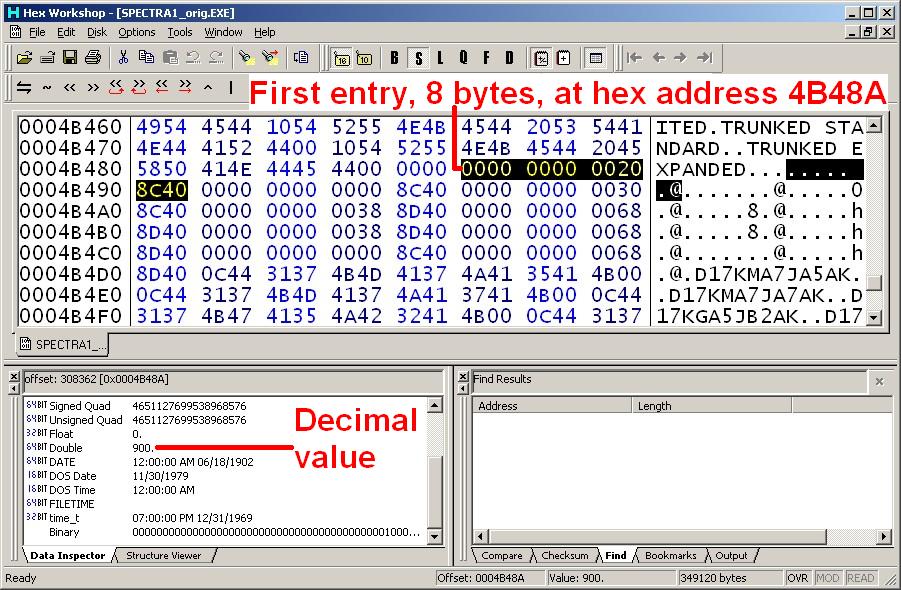
Addresses and data bytes in these tables are in hexadecimal format. The data is in standard Intel floating point (8-byte) representation. "Addr." is the address within the file of the first byte in each table entry. "1" thru "8" are the sequential byte addresses. "Dec." is the decimal value of the number, and it specifies the frequency in MHz. "Use" tells what this particular number is used for. "Chg?" indicates which values will be changed later with "Y". The first table is straight-forward:
Addr. +0 +1
+2 +3 +4
+5 +6 +7
Dec. Use Chg?
4B48A 00 00
00 00 00
20 8C 40
900.0 Band
4B492 00 00
00 00 00
00 8C 40
896.0 TX lo
4B49A 00 00
00 00 00
30 8C 40
902.0 TX hi Y
4B4A2 00 00
00 00 00
38 8D 40
935.0 T/A lo Y
4B4AA 00 00
00 00 00
68 8D 40
941.0 T/A hi
4B4B2 00 00
00 00 00
38 8D 40
935.0 RX lo Y
4B4BA 00 00
00 00 00
68 8D 40
941.0 RX hi
4B4C2 00 00
00 00 00
00 8C 40
896.0 RSS lo
4B4CA 00 00
00 00 00
68 8D 40
941.0 RSS hi
Here's an actual screen shot of the data in this table with the first row highlighted. Note the decimal value shown in the Data Inspector window.
The second table is laid out similarly except for an extra entry:
Addr. +0 +1
+2 +3 +4
+5 +6 +7
Dec. Use Chg?
4B7B2 00 00
00 00 00
20 8C 40
900.0 Band
4B7BA 00 00
0 00 00
E0 8C 40
892.0 TX lo
4B7C2 00 00
00 00 00
F8 8C 40
895.0 ?????
4B7CA 00 00
00 00 00
30 8C 40
902.0 TX hi Y
4B7D2 00 00
00 00 00
18 8D 40
931.0 T/A lo Y
4B7DA 00 00
00 00 00
68 8D 40
941.0 T/A hi
4B7E2 00 00
00 00 00
18 8D 40
931.0 RX lo Y
4B7EA 00 00
00 00 00
68 8D 40
941.0 RX hi
4B7F2 00 00
00 00 00
E0 8C 40
892.0 RSS lo
4B7FA 00 00
00 00 00
68 8D 40
941.0 RSS hi
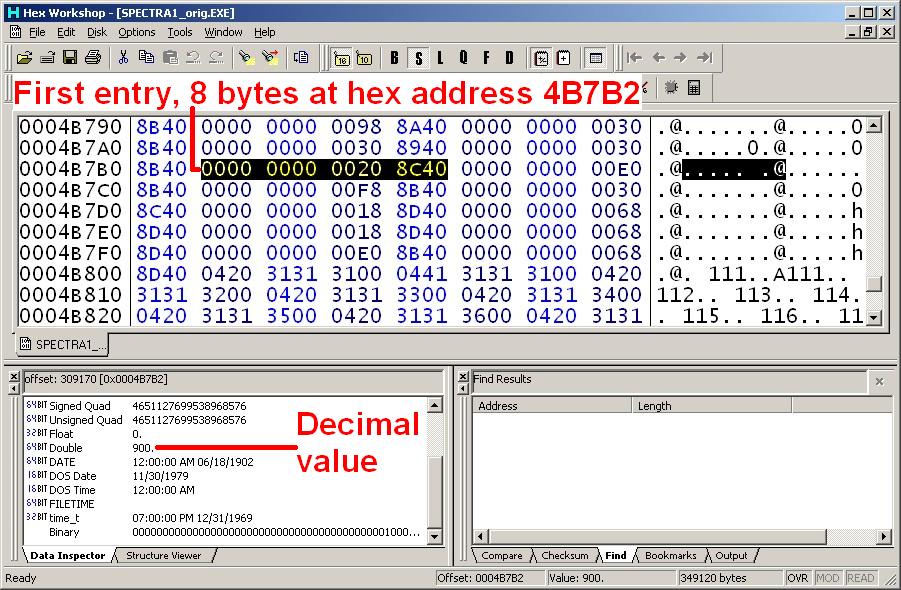
Here's an actual screen shot of the data in this table with the first row highlighted.
Except for the 895.0 value in the second table, the entries in these areas seem to have the following meaning or usage:
The second and third pair meanings could be reversed, but since the values are identical, it doesn't matter for this discussion.
To allow the radio to cover the amateur band of 902-928 MHz, you need to expand the transmit and receive ranges a bit. I set the transmit ranges to go up to 904 MHz, and I set the T/A and receive ranges to go down to 926 MHz. Right now, the 25 MHz split repeater frequencies only use 902-902.999 and 927-927.999 MHz.
The entries with 'Y' in the "Chg?" columns above will be changed to the values shown in the table below. Only the bytes in red need to be changed. Note that these addresses are NOT contiguous:
Addr. +0 +1
+2 +3 +4
+5 +6 +7
Dec. Use
4B49A 00 00
00 00 00
40 8C
40 904.0 TX hi
4B4A2 00 00
00 00 00
F0 8C
40 926.0 T/A lo
4B4B2 00 00
00 00 00
F0 8C
40 926.0 RX lo
Addr. +0 +1
+2 +3 +4
+5 +6 +7
Dec. Use
4B7CA 00 00
00 00 00
40 8C
40 904.0 TX hi
4B7D2 00 00
00 00 00
F0 8C
40 926.0 T/A lo
4B7E2 00 00
00 00 00
F0 8C
40 926.0 RX lo
By applying the above fixes, the radio can be programmed to transmit from 896 to 904 MHz, and to transmit and receive from 926 to 941 MHz. Unfortunately, there was a problem with talk-around losing the coded squelch setting. Another location was found with a value of 931.0 that has to be changed to 926.0 to allow talk-around to work properly. After applying this fix, the radio will now turn on the "DIR" indicator for any mode programmed as a simplex channel, where the transmit frequency equals the receive frequency. The location and bytes are shown below:
Addr. +0 +1
+2 +3 +4
+5 +6 +7
Dec. Use
4E120 00 00
00 00 00
18 8D
40 931.0 Old Value
4E120 00 00
00 00 00
F0 8C
40 926.0 New Value
To fix the checksum, I modified two error messages that are nearby. Here's the original text:
4B9E0: Negative number in Setvector....
4BA07: Negative number in Setvector....
I changed the messages as follows: the first 8 bytes of the word "Setvector" in the first message were changed to spaces (hex 20); only the "r" remains original. The first 7 bytes of the word "Setvector" in the second message were changed to spaces (hex 20). The 8th byte of the word "Setvector" in the second message was changed to "g" (hex 67); only the "r" remains original. Other locations could also be changed, but these were all I needed to get the checksum to come out correct.
You could use different values in the tables, but you'd have to experiment with, and possibly change, the checksum so it comes out the same as the original file had. This same procedure could be used, with different values, to change frequency limits for other bands.
Factoid / Gotcha:
If the transmit and T/A ranges overlap and cover the same frequencies, RSS will think a transmit frequency in the overlapped area is a T/A frequency, and it won't allow you to enable T/A. The first time I hex-edited the tables, I set both transmit and T/A ranges to 896-941. Any transmit frequency I programmed the radio for would first get detected in the T/A range, and the T/A option was always disabled. Once I made the ranges narrower, RSS properly detected a 902 MHz frequency in the TX range rather than the T/A range, and I could enable T/A. Frequencies in the 927 MHz range are properly detected in the T/A range and the T/A option will remain disabled.
Acknowledgements and Credits:
I used Hex Workshop (for Windows), version 4.23, available from BPSoft at www.bpsoft.com. This is probably one of the best hex editors on the market.
Spectra, PL, DPL, RSS and "Radio Service Software" (and a bunch of other things) are registered trademarks of Motorola, Inc.
Contact Information:
The author can be contacted at: his-callsign [ at ] comcast [ dot ] net.
Back to the top of the page
Up one level (Spectra index)
Up two levels (Moto index)
Back to Home
This page originally posted May 2006.
Major revisions and rewrite were done in April 2011.
Article text, images, and hand-coded HTML © Copyright 2006,2011 By
Robert W. Meister WA1MIK.
This web page, this web site, the information presented in and on its pages and in these modifications and conversions is © Copyrighted 1995 and (date of last update) by Kevin Custer W3KKC and multiple originating authors. All Rights Reserved, including that of paper and web publication elsewhere.